- DATE:
- AUTHOR:
- Checkr
Cancel Individual Criminal Searches
What's new
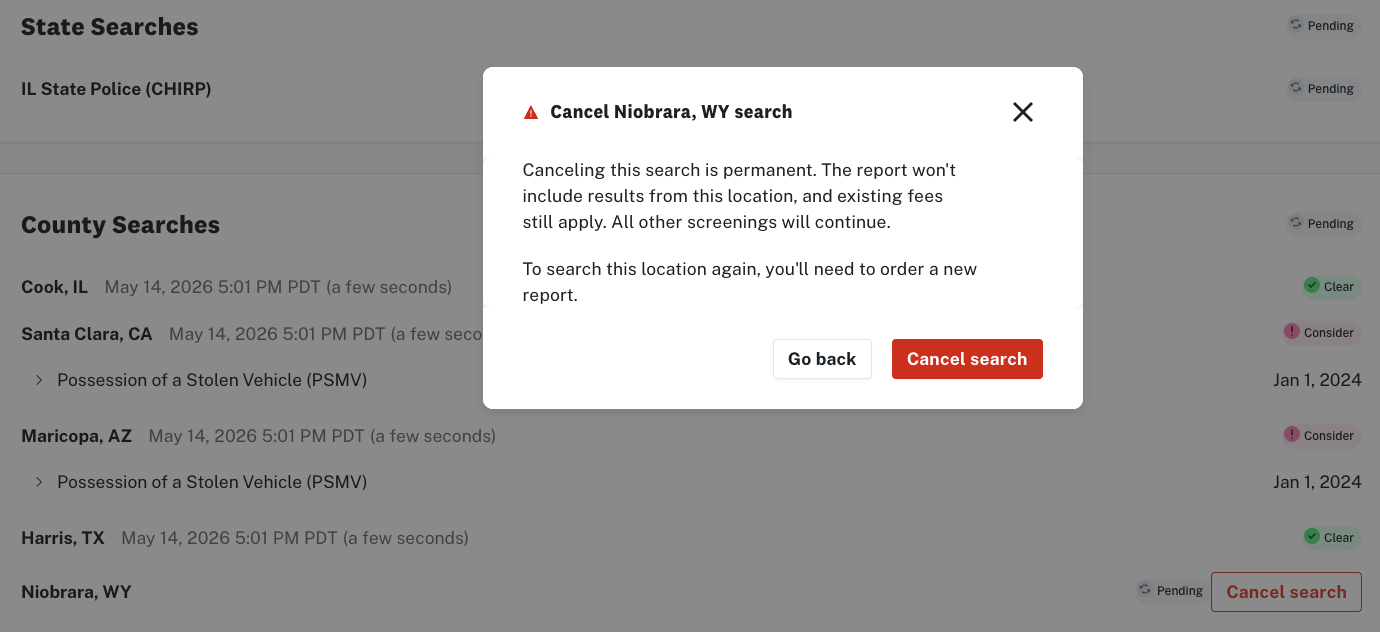
You can now cancel individual criminal searches directly from a candidate's report, without canceling the entire screening.
Previously, your only option was to cancel the full report. Now, if a single county or state criminal search is taking longer than expected, you can cancel just that search and move forward with the rest of the results.
How it works
A Cancel search button now appears on individual county and state criminal searches within the report page. The button is available when a search is pending and waiting on vendor results.
To cancel a search:
Open the candidate's report.
Locate the county or state criminal search that is delayed.
Click Cancel search next to that search.
Confirm the cancellation in the modal that appears.
The cancelled search will be reflected on the report. The remaining searches on the report are unaffected and will continue to process normally.
What this does not replace
This is a new capability, it is in addition to the existing Cancel Screening option, not a replacement. Cancel Screening still cancels the entire report. Use the new per-search cancel when you want to unblock a report without discarding all results.
Billing
Cancelled searches are still billable. Courts charge Checkr when a search is initiated, regardless of whether it completes. If pass-through fees (PTFs) were incurred before cancellation, those will appear on your invoice as usual. Search fees also apply.
Questions?
Reach out to your Customer Success Manager or contact Checkr Support.